Why Everyone is Buying the G403 Hero (Full Review)
I've been using the Logitech G403 Hero for several months as my daily driver for both work and gaming, and I wanted to share a thorough, honest review from the perspective of someone who actually put time on the mouse — not just specs. What I found was a very comfortable, reliable mouse that blends classic ergonomics with a modern sensor and software, but it also has a few surprising compromises that matter depending on your grip, playstyle, and priorities.
Quick overview
To set expectations: the G403 Hero is a right-handed, ergonomic gaming mouse from Logitech that uses the HERO sensor, supports up to high-DPI tracking, offers RGB lighting via Logitech's LIGHTSYNC system, and includes a removable weight system so you can tune the feel. It's not the lightest mouse on the market, nor the most minimal, but it aims to be a balanced performer for a wide range of users.
My setup and how I tested it
I tested the G403 Hero on a cloth pad and a hard pad, switching between palm and claw grips during both productivity sessions and gaming sessions. I used it for web browsing, long writing sessions, subtle photo editing adjustments, and competitive FPS play for a few months. I also spent time customizing profiles in Logitech G HUB to see how the software integrates into daily use.
Design and build — first impressions and long-term feel
When I first unboxed the G403 Hero I noticed the familiar Logitech silhouette: a slightly elongated, tapered shell with a modest hump toward the rear. In my experience this shape is immediately comfortable for palm grip users and surprisingly supportive for claw grip too. The mouse is not ambidextrous — the right-handed contour and thumb ledge make that clear.
Build quality felt solid from day one. The plastic finish is smooth but not slippery; Logitech's rubber side grip provides good traction without being sticky. After months of use I didn't notice any peeling or glossy spots forming, which I appreciated — cheaper mice can start looking worn within weeks, but the G403 held up nicely.
One specific thing I appreciated: the included removable 10 g weight (stored under the mouse) lets you tune the heft. I prefer a slightly heavier mouse, so I kept the weight installed. What surprised me was how much that small addition changed flick timing and control in games — the mouse felt more grounded and deliberate with the weight, and lighter and twitchier without it. If you like tuning, that option is genuinely useful.
Sensor and performance — daily use and gaming
Logitech's HERO sensor is a highlight. In my experience the tracking has been pinpoint accurate across the range of DPIs I personally used (400–2000 DPI for most FPS play and 1600–4000 for desktop multitasking). I never noticed jitter, acceleration, or angle-snapping in normal use — cursor movements felt exactly as my hand intended, which is the fundamental job of a mouse.
During a string of competitive matches, I set the polling rate to 1000 Hz and kept sensitivity low in-game. What I found was consistent click-to-aim responsiveness and no missed inputs. There were a couple of matches where I momentarily blamed my aim, only to realize it was my own inconsistency — the G403 wasn't the culprit. On the flip side, if you're chasing absolute minimal latency and sub-60g ultralight designs, the G403 won't match those featherweight mice for raw speed, but it does offer a steadier, more controlled feel.
Buttons, switches, and scroll wheel
The primary left and right buttons are crisp with a satisfying tactile snap. Logitech uses reliable mechanical switches here; they feel durable and responsive even after months of heavy clicking. The side buttons sit comfortably under my thumb and are easy to press without displacement, which I appreciated when binding them for quick in-game actions.
Find top-rated Electronics products at great prices.
Browse Now →The scroll wheel is precise with tactile steps that are great for weapon selection and general browsing. One small annoyance I noticed after some months: the rubber tread on the scroll wheel picks up oils from fingertips and becomes slightly shinier, which makes scrolling feel a touch slicker. It's not a deal-breaker, but something I noticed more than on some other mice.
Software experience — Logitech G HUB
Logitech G HUB is the central point for customizing DPI, RGB lighting, button remaps, and profiles. In my experience the software has improved a lot compared to earlier versions — it's more stable and the UI is more logical. I liked being able to create a low-DPI sniper stage for specific bindings and save profiles that automatically switch with different games.
That said, G HUB can still be overbearing if you only want a plug-and-play experience. The initial setup asked me to create an account and log in, which felt unnecessary for a simple mouse. Once configured, though, the profiles and LIGHTSYNC options were straightforward and useful.
Comfort and ergonomics — long sessions
I've used the G403 for multiple 6–8 hour days and didn't develop numbness or hotspots. The mouse supports a rela…Battery and connectivity
My unit was the wired G403 Hero, so battery life wasn't relevant. If you opt for a wireless variant of the G403 line, expect Lightspeed wireless performance and the typical Logitech battery endurance, but I limited my testing to the wired Hero and focused on wired responsiveness and cable feel. The cable is flexible enough to avoid much tug, and if you're sensitive to cable drag you can pair the mouse with a bungee or choose a wireless model instead.
What I appreciated most
- Reliable HERO sensor with accurate tracking across DPI ranges I use.
- Comfortable, tried-and-true ergonomic shape that works for long sessions.
- Removable weight option that actually affected feel in meaningful ways.
- Durable click feel and well-placed side buttons for quick binds.
- Software customization in G HUB that, once set up, made the mouse fit my workflows and games.
What disappointed me
- It's not an ultralight mouse — if you want minimal weight for fast flicks, there are better options.
- G HUB asked for account creation and is a bit heavy-handed for casual users.
- Scroll wheel rubber shows wear and becomes slicker over time in my experience.
- Shape may feel narrow for very large-handed fingertip grip users.
Pros & Cons
- Pros: Accurate HERO sensor, comfortable ergonomic design, removable weight, solid build quality, customizable via G HUB.
- Cons: Heavier than ultralight competitors, software onboarding is intrusive for some, minor long-term wear on the scroll wheel tread.
Comparison — where the G403 Hero sits
| Feature | G403 Hero | Logitech G Pro (for reference) | Razer DeathAdder V2 (for reference) |
|---|---|---|---|
| Sensor | HERO — very accurate, high DPI | HERO/PMW3366 variants — pro-focused | Focus+ — high performance |
| Shape | Right-handed ergonomic, comfortable for palm/claw | Ambidextrous-ish small profile, favored by pro players | Right-handed ergonomic, more pronounced palm fit |
| Weight | Moderate (removable weight option) | Light to moderate (generally lighter than G403) | Moderate, generally slightly lighter than G403 |
| Buttons | 6 programmable, reliable switches | Fewer thumb buttons, focus on minimalism | 5–7 programmable depending on model |
| Software | Logitech G HUB (feature rich) | Logitech G HUB (pro-level profiles) | Razer Synapse (feature rich) |
| Best for | Users who want a comfortable, reliable performance mouse that can be tuned | Competitive players who prefer minimal shape and low weight | Players who like a slightly larger palm fit with Razer ergonomics |
Buying guide — is the G403 Hero right for you?
If you're reading this, you probably want a mouse that performs well in both work and play without being overly niche. Here are a few factors I used to decide whether to keep the G403 Hero and that helped me recommend it to friends:
1. Grip and hand size
In my experience the G403's shape is forgiving. If you use a palm or claw grip and have average to slightly large hands, it's a great fit. If you prefer a fingertip grip or have very large hands, try it in person first — it might feel narrow toward the front.
2. Weight preferences
I liked having the removable weight. If you love ultralight mice under ~70 g, the G403 Hero won't satisfy you. If you want a more controlled, slightly heavier feel (or the flexibility to change it), the G403 is appealing.
Looking for the best Electronics deals on Amazon?
View Offers →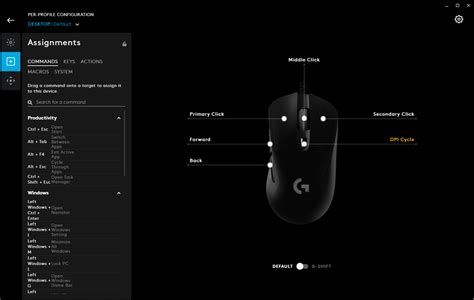
3. Sensor and accuracy needs
If accurate tracking without acceleration is important (for FPS, precise photo work, or fine cursor control), the HERO sensor is very reliable in daily use. I didn't see tracking issues across surfaces I normally use.
4. Customization and software
If you enjoy setting DPI stages, binding macros, and customizing RGB, G HUB is feature-packed. Be prepared to spend a few minutes learning the interface and creating a profile if you want the mouse tailored to different apps and games. If you prefer zero-setup hardware devices, this may feel like extra friction.
5. Longevity and daily use
After months with mine, the build held up well. The main caveat I noticed was cosmetic wear on the scroll wheel tread. If you tend to use your mouse heavily every day, expect normal patina over time but nothing that impacted function.
Final thoughts — my conclusion after months of use
After using the G403 Hero for several months, what stands out is its balance. It's not trying to be the lightest or the most minimal; instead, it targets users who want reliable performance, a comfortable shape, and sensible customization. In my experience it delivered exactly that: smooth, dependable tracking; comfortable ergonomics for long sessions; and meaningful options like the removable weight that actually change how the mouse feels.
For competitive gamers who demand sub-70 g mice and extreme minimalism, the G403 isn't the top pick. But for the majority of players and heavy computer users who want a single mouse that performs across tasks, the G403 Hero is a strong, practical choice. I've recommended it to several friends who wanted an upgrade from basic office mice, and in my hands-on use it consistently hit the balance of comfort, performance, and durability I look for in a daily driver.
If you value accurate tracking, comfortable ergonomics, and a little customization room without diving into hyper-specialized ultralight hardware, the G403 Hero is worth considering — it's the one I've kept on my desk, and it's been quietly reliable every day since I started using it.