The Ultimate Setup Guide for Your Roomba 694 690 692
The dawn of the domestic robotics era has transitioned from a futuristic novelty into a practical necessity for the modern household. Among the various contenders in the automated floor care market, the iRobot Roomba 600 series—specifically the 694, 690, and 692 models—stands out as a quintessential entry point for those seeking a balance between affordability, reliability, and smart functionality. These models have become staples in homes ranging from compact urban apartments to sprawling suburban residences, primarily because they democratize a technology that was once reserved for high-end luxury budgets. Understanding how to properly integrate these devices into your living space is the difference between a robot that merely wanders and one that serves as a cornerstone of your home maintenance strategy.
Setting up a robotic vacuum is more than just plugging in a dock and pressing a button. It involves environmental preparation, network configuration, and a deep understanding of how the machine perceives its surroundings. Buyers typically gravitate toward these specific models because they offer the "connected" experience—allowing for smartphone control and voice integration—without the steep price tag of the s-series or j-series lineups. However, to extract the maximum value from these machines, users must navigate the nuances of the iRobot Home App, physical barrier management, and routine maintenance protocols. This guide serves as an exhaustive roadmap for optimizing the Roomba 694, 690, and 692, ensuring your floors remain pristine while the human interaction required remains at an absolute minimum.
Product Analysis: The Roomba 600 Series Architecture
The Roomba 694, 690, and 692 are fundamentally built on the same mechanical architecture, utilizing iRobot’s patented 3-Stage Cleaning System. This system is designed to loosen, lift, and suction dirt, dust, and hair from both hard floors and carpets. Unlike the more expensive models that use rubber debris extractors, these 600-series models utilize a dual-brush system: a multi-surface brush and a bristle brush. This combination is particularly effective at agitated carpet fibers to pull up deep-seated sand and grit, though it does require more frequent manual cleaning to remove tangled hair.
From a hardware perspective, these robots utilize iAdapt Navigation, a suite of sensors that allows the robot to navigate under and around furniture. It is important for new owners to understand that these models do not "map" the home in the way that VSLAM (Vision Simultaneous Localization and Mapping) or LiDAR-based robots do. Instead, they use a "bump-and-run" logic combined with acoustic sensors that detect high concentrations of dirt. This is known as Dirt Detect Technology. When the sensors find a particularly messy area, the Roomba will circle back and clean that spot more intensely. While this might look random to the casual observer, it is a mathematically backed coverage method that ensures every reachable part of the floor is touched multiple times over a long cleaning cycle.
The distinction between the 690, 692, and 694 is largely aesthetic and relates to their release cycles. The 690 was an earlier flagship of the connected 600-series, often featuring a silver and black chassis. The 692 and 694 are newer iterations, with the 694 featuring a sleek, all-black finish and a slightly more refined top plate. Internally, their suction power and battery life are nearly identical, providing roughly 90 minutes of runtime before they automatically seek out their "Home Base" charging station. This self-docking capability is a critical feature, as it allows the robot to be truly autonomous during its scheduled runs.
Step-by-Step Physical Setup and Placement
The first physical interaction with your Roomba involves the placement of the Home Base. While it may seem trivial, the location of the dock dictates the robot’s ability to successfully end its mission. The Home Base emits an infrared beam that the Roomba "sees" when it needs to return. If this beam is obstructed or if the dock is placed in a cramped corner, the robot may wander until its battery dies, leaving it stranded in the middle of a room.
Ideal placement requires a flat, hard surface. Avoid placing the dock on thick rugs, as the transition can sometimes cause the robot to nudge the dock out of alignment. There should be at least 1.5 feet of clearance on each side and at least 4 feet of straight, unobstructed floor space in front of the dock. Furthermore, keep the Home Base away from stairs or ledges; while the Roomba has cliff sensors to prevent it from falling, the infrared signals from the dock can occasionally interfere with the cliff sensors' logic if placed too close to a drop-off. Once positioned, plug the dock into a wall outlet, ensuring the cable is tucked away so the robot doesn't snag it during its departure or arrival.
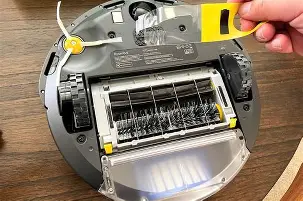
Before the first run, flip the robot over and remove any yellow plastic pull-tabs. These are usually found in the battery compartment and near the brushes to prevent the motor from engaging during shipping. It is also recommended to let the Roomba charge for a full 3 or 4 hours before its maiden voyage. A fully conditioned battery ensures that the internal software can accurately calibrate the expected runtime and power management cycles.
Looking for the best Electronics deals on Amazon?
Browse Now →Digital Integration: Connecting to the iRobot Home App
To unlock the "Smart" in these smart vacuums, you must connect them to your home’s Wi-Fi network. It is vital to note that the 690, 692, and 694 models only support 2.4GHz Wi-Fi bands. Many modern routers use "Smart Connect" which merges 2.4GHz and 5GHz bands into one SSID. During setup, make sure your smartphone is connected to the 2.4GHz band of your network. If the connection fails, you may need to temporarily disable the 5GHz band in your router settings or move closer to the router for the initial handshake.
Download the iRobot Home App from your respective app store. Once you create an account, select "Add a Robot." The app will guide you through a series of prompts. You will typically be asked to press and hold the "Home" and "Spot" buttons on the robot simultaneously until you hear a chime or see the Wi-Fi icon blink green. This puts the Roomba into a localized broadcast mode, allowing your phone to pass the network credentials to the robot. Once connected, you can name your Roomba—a surprisingly common tradition among owners that adds a touch of personality to the household chore.
Through the app, you can set "Cleaning Schedules." For most households, scheduling the Roomba to run while the occupants are away is the most efficient strategy. Since the 600-series uses a louder motor compared to some high-end brushless models, having it work while you are at the office or running errands minimizes the noise disruption. You can also integrate the robot with Amazon Alexa or Google Assistant. Once the account linking is complete, commands like "Alexa, tell Roomba to start cleaning" allow for hands-free operation, which is particularly useful if you’ve just had a spill in the kitchen.
Roomba-Proofing Your Environment
To have a successful experience with the Roomba 694, 690, or 692, one must accept a fundamental truth: you must Roomb…If your home has areas that should be strictly off-limits—such as a pet’s water bowl or a delicate floor lamp—the 690 usually includes a "Dual Mode Virtual Wall Barrier." For the 692 and 694, these may need to be purchased separately depending on the regional bundle. These small towers emit an invisible infrared fence that the Roomba will not cross. Alternatively, they can create a "Halo" zone, which is a circular protective boundary roughly 24 inches in diameter. This is perfect for protecting sensitive items without having to physically block them off with furniture.
Pros and Cons of the Roomba 600 Series
Every piece of technology involves trade-offs. The 600 series is designed for a specific type of user, and understanding these strengths and weaknesses will help manage expectations.
- Pro: Durability - The 600 series is built like a tank. Because it uses simpler mechanical systems than the camera-based models, there are fewer complex components to fail over time.
- Pro: Ease of Repair - iRobot designed these units to be modular. Replacing a brush module, a front wheel, or even a battery requires only a screwdriver and a few minutes of time.
- Pro: Excellent Carpet Agitation - The bristle brushes are superior at digging into carpet fibers compared to some silicone rollers, making them great for homes with wall-to-wall carpeting.
- Pro: Dirt Detect Technology - The ability to sense particularly dirty areas and focus on them ensures a deeper clean in high-traffic zones like entryways.
- Con: Hair Tangles - Unlike the tangle-free rollers on higher models, the 600 series bristle brushes will wrap long hair and pet fur around the axle, requiring manual removal weekly.
- Con: Random Navigation - The robot will hit the same spot four times and miss another spot entirely on a single run. Over a week of daily runs, it covers everything, but it is not efficient in a single go.
- Con: No "No-Go Zones" in App - Because these robots don't have persistent maps, you cannot draw boxes on your phone to keep them out of certain rooms; you must use physical barriers.
Comparison of Roomba 600-Series Models
When selecting between these three, it often comes down to the current price point and the specific accessories included in the box. Here is a breakdown of how they compare:
| Feature | Roomba 690 | Roomba 692 | Roomba 694 |
|---|---|---|---|
| Color/Finish | Silver/Black | Charcoal Gray | All-Black Matte/Gloss |
| Navigation | iAdapt 1.0 (Random) | iAdapt 1.0 (Random) | iAdapt 1.0 (Random) |
| Wi-Fi Connectivity | Yes (2.4GHz) | Yes (2.4GHz) | Yes (2.4GHz) |
| Virtual Wall Included | Usually Included | Usually Not Included | Model Dependent |
| Brush Type | Dual Multi-Surface Bristle | Dual Multi-Surface Bristle | Dual Multi-Surface Bristle |
| Battery Life | Up to 90 Minutes | Up to 90 Minutes | Up to 90 Minutes |
Buying Guide: Is the 600 Series Right for You?
Prospective buyers often ask if the 600 series is "enough" for their home. The answer depends heavily on your floor plan and your tolerance for "pre-cleaning." These models are best suited for smaller to medium-sized homes (under 1,500 square feet) with relatively open floor plans. Because they navigate randomly, they can struggle in extremely complex layouts with many small rooms, as they may find their way into a room and then fail to find the exit before the battery runs low.
Discover deals on Electronics — updated daily.
View Offers →Pet owners will find these models effective but high-maintenance. If you have a dog that sheds heavily, the small dustbin (approx. 0.6 liters) and the bristle brushes will require your attention after every two or three runs. However, if your primary concern is maintaining a baseline of cleanliness against dust, crumbs, and light debris, the 694/692/690 models represent some of the best value in the industry. They are also an excellent choice for those who are wary of "camera-based" robots due to privacy concerns, as these models do not have any optical cameras and do not take images of the home's interior.
Another factor to consider is the floor type. While they work on both hard floors and carpets, they are particularly adept at moving between the two. The "Auto-Adjust Cleaning Head" automatically adapts its height to keep the multi-surface brushes in close contact with different floor surfaces. If your home has many transitions—such as wood floors with various area rugs—the 600 series handles these height changes with impressive mechanical grace.
Advanced Maintenance for Longevity
To keep your Roomba running for years, a regular maintenance schedule is mandatory. Unlike a traditional vacuum, a robot vacuum is a high-precision instrument that operates in a harsh, dusty environment. First, the bin should be emptied after every cleaning mission. While doing so, tap the filter against the side of the trash can to release fine dust. Filters should be replaced every 2 months to maintain proper suction and prevent the motor from overheating.
The brushes require the most attention. The 600 series comes with a specialized flat or ring-shaped cleaning tool. Use this to slide over the bristle brush to cut away hair. Pay special attention to the yellow bearings on the ends of the brushes; hair often gets trapped under these bearings and can melt the plastic housing if left to accumulate. Additionally, wipe the "Cliff Sensors" on the bottom of the robot with a clean, dry microfiber cloth. If these sensors become caked with dust, the Roomba may refuse to move, thinking it is permanently on the edge of a staircase.
Finally, check the front swivel wheel. This wheel can be popped out with a bit of force. Ensure there is no hair wrapped around the axle inside the wheel well. A jammed front wheel can lead to the robot dragging across your hardwood floors, potentially causing scratches over time. By spending five minutes a week on these tasks, you can easily extend the life of your Roomba 694, 690, or 692 to five years or more.
Conclusion
The Roomba 694, 690, and 692 are much more than entry-level gadgets; they are workhorse robots that provide a genuine solution to the tiring task of daily floor maintenance. By taking the time to set up the Home Base correctly, optimizing your Wi-Fi connection, and preparing your home environment, you ensure that your investment pays off in the form of consistently clean floors. While they lack the sophisticated mapping and self-emptying features of their more expensive siblings, their mechanical simplicity and ease of repair make them a smart choice for the practical consumer. Embracing the "bump-and-run" logic and staying on top of brush maintenance will allow these robots to become an invisible but indispensable part of your household's rhythm. As the world of home automation continues to expand, these models remain a testament to the idea that reliable, effective technology does not always need to be the most complex or the most expensive option available.