Hp Color Laserjet Pro 4201Dw 4202Dw Specs, Features, and Value: Is it worth the price tag?
In the evolving landscape of modern business, the demand for reliable, high-speed color printing has never been more critical. As hybrid work models become the standard, small to medium-sized businesses (SMBs) and dedicated home offices require hardware that bridges the gap between consumer-grade convenience and enterprise-level performance. HP has long been a dominant force in this sector, and their newest iteration in the mid-range color laser category—the HP Color LaserJet Pro 4201dw and 4202dw—aims to set a new benchmark for productivity. This article provides an exhaustive analysis of these units, exploring their technical specifications, day-to-day features, and long-term value to determine if they justify their position in the market.
Understanding the Series: 4201dw vs. 4202dw
At first glance, potential buyers may find the numbering system slightly confusing. Functionally, the HP Color LaserJet Pro 4201dw and 4202dw are nearly identical siblings produced for different retail and distribution channels. They share the same engine, print technology, and chassis. The differentiation usually boils down to specific regional availability or slight variations in bundled services and support. For the purpose of this review, they will be treated as the same core machine, as they provide identical performance metrics in terms of speed, quality, and connectivity.
These printers are designed to act as the workhorse for teams of up to 10 users. They are high-speed, single-function devices, meaning they prioritize pure printing performance over the all-in-one scanning and copying capabilities found in the MF (Multifunction) series. This specialization allows HP to focus on mechanical durability and throughput, making these models ideal for environments where documents are generated frequently and volume is consistent.
Technical Specifications and Performance Metrics
The "Pro" designation in the 4200 series is backed by hardware capable of handling demanding workflows. Below is a detailed breakdown of the technical specifications that define these machines.
| Feature | Specification Detail |
|---|---|
| Print Speed | Up to 35 ppm (pages per minute) Black and Color |
| First Page Out | As fast as 9.1 seconds (Black); 10.0 seconds (Color) |
| Monthly Duty Cycle | Up to 50,000 pages |
| Recommended Monthly Volume | 750 to 4,000 pages |
| Print Quality | Up to 600 x 600 dpi; HP ImageREt 3600, Pantone Calibrated |
| Processor Speed | 1200 MHz |
| Memory | 512 MB NAND Flash, 512 MB DRAM |
| Connectivity | Gigabit Ethernet, Hi-Speed USB 2.0, Wi-Fi 802.11ac, Bluetooth Low Energy |
| Paper Handling | 250-sheet input tray, 50-sheet multipurpose tray |
The print speed is the standout metric here. While older models in this price bracket often hovered around the 22 to 27 ppm range, the 35 ppm capability of the 4201dw/4202dw places it firmly in the high-efficiency category. This speed applies to both monochrome and color documents, ensuring that colorful presentations or marketing brochures don't throttle the office workflow.
Workflow Features and Modern Connectivity
A printer is only as useful as its ease of access. HP has integrated several software and hardware features into the 4200 series to ensure that users spend less time managing the device and more time on their actual tasks. The inclusion of dual-band Wi-Fi with self-healing capabilities is a significant addition. In many office environments, network interference can lead to dropped print jobs or "offline" errors. Self-healing Wi-Fi automatically detects and resolves connectivity issues, reducing the need for IT intervention.
Furthermore, the HP Smart App integration continues to be a major selling point. Users can print documents directly from cloud storage platforms like Google Drive, Dropbox, or OneDrive. For the modern professional who often works from a smartphone or tablet, the Bluetooth Low Energy (BLE) setup makes the initial pairing and subsequent mobile printing incredibly seamless. The printers also support standard protocols like Apple AirPrint and Mopria, ensuring compatibility across all operating systems without requiring proprietary drivers in many cases.
TerraJet Toner Technology
One of the most significant architectural changes in this generation is the introduction of HP TerraJet Toner. HP claims this new toner technology is designed to deliver more vibrant colors and sharper details while simultaneously consuming less energy. From an environmental perspective, TerraJet cartridges are engineered to use less plastic and reduce energy consumption during the fusing process. For the business owner, this translates to a lower carbon footprint and potentially lower electricity costs over the lifespan of the machine. Practically, the print quality remains exceptional, with the Pantone calibration ensuring that "brand colors" remain consistent from the digital screen to the physical page.
Real-World Use Cases: Who is this for?
Buying a printer of this caliber is an investment, and understanding where it thrives is key to determining its value. Let's look at three typical scenarios where the 4201dw/4202dw excels.
Shop the latest Electronics picks on Amazon.
Shop Amazon →The High-Volume Boutique Agency
Marketing firms and design boutiques often need to print proofs, project timelines, and client presentations. The Pantone calibration on the 4200 series ensures that a specific shade of navy or crimson looks exactly as intended. The speed allows a team to print ten copies of a 30-page deck in under ten minutes, a task that would take significantly longer on a standard home inkjet or a lower-end laser printer.
The Busy Professional Services Office
Legal offices or accounting firms may not need color on every page, but they do require high-speed monochrome output and extreme reliability. The 4201dw handles the heavy text-based printing with ease, while the ability to print professional-looking color charts for financial reports adds a layer of versatility. The robust security features, including HP Wolf Pro Security, are also vital for these sectors where data privacy is non-negotiable.
The Distributed Work-from-Home Executive
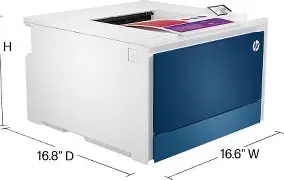
For executives or managers who have moved their operations to a home office, desktop space is often at a premium, but performance expectations remain high. The 4201dw/4202dw has a relatively compact footprint compared to industrial-sized office copiers but provides the same "engine" speed, allowing the home professional to maintain corporate-level productivity without dedicating half a room to hardware.
Security in the Age of Cyber Threats
Printers are often the overlooked "weak link" in a company's cybersecurity strategy. HP addresses this with their…Pros and Cons
No piece of hardware is perfect. While the 4200 series is a formidable contender in the laser market, it is important to weigh the advantages against the limitations.
- Pro: Exceptional Speed - At 35 ppm, it is among the fastest in its price class for both color and black printing.
- Pro: High Print Quality - Pantone calibration and TerraJet toner produce crisp text and rich, accurate colors suitable for external marketing.
- Pro: Robust Connectivity - Wi-Fi, Ethernet, and advanced mobile app support make it accessible from any device.
- Pro: Compact Design - Efficient use of space makes it suitable for desktop placement without sacrificing paper capacity.
- Pro: Security Focus - HP Wolf Pro Security provides peace of mind for businesses handling sensitive data.
- Con: High Cost of Consumables - Laser printers, especially color ones, involve significant toner costs. Genuine HP cartridges can be expensive over time.
- Con: Single-Function Only - There is no flatbed scanner or automatic document feeder (ADF) for copying or scanning.
- Con: Basic Display - The 2-line LCD display is functional but lacks the intuitive touch-screen interface found on more expensive models or the MFP variants.
- Con: Noise Level - When running at full 35 ppm speed, the fan and mechanical noise can be noticeable in a very quiet office environment.
The Buying Guide: What to Consider Before Purchase
Before committing to the HP Color LaserJet Pro 4201dw or 4202dw, there are several factors a buyer must evaluate to ensure the machine fits their specific needs.
1. Single-Function vs. Multifunction
The most important question is whether you need to scan or copy. If your office is entirely digital and you only need to output physical documents, the 4201dw is perfect. However, if you frequently need to scan contracts or copy ID cards, you should look at the HP Color LaserJet Pro MFP 4301 series. Buying the single-function 4201dw is cheaper upfront, but only if you don't end up needing a separate scanner later.
2. Total Cost of Ownership (TCO)
The "price tag" mentioned in the title of this article is only the beginning. Users must look at the cost per page. HP offers standard and high-yield (X) cartridges. While the high-yield cartridges have a higher purchase price, they significantly lower the cost per page and are essential for anyone printing more than 1,000 pages per month. Always factor the cost of a full set of replacement toner into your first-year budget.
Find top-rated Electronics products at great prices.
Shop Amazon →3. Monthly Volume Expectations
This printer is "overkill" for someone printing five pages a week. Laser printers thrive on being used. If your volume is very low, the internal components can actually suffer from stagnation, and the higher price of laser toner compared to some ink-tank systems won't be justified. Conversely, if you print more than 4,000 pages a month, you might find the 250-sheet tray needs refilling too often, and you might be better served by a 500-series enterprise machine.
4. Network Environment
Consider how you will connect the printer. If you have a wired office, the Gigabit Ethernet port is the way to go for the most stable and fastest data transfer. If you rely on Wi-Fi, ensure your router is modern enough to take advantage of the 802.11ac protocols the printer supports. The "self-healing" feature is excellent, but it works best in environments with a strong baseline signal.
Analyzing the Value: Is it worth the price?
The HP Color LaserJet Pro 4201dw/4202dw usually sits in the mid-high range for a desktop laser printer. To determine if it is worth the price, we have to look at the competition. Many competitors offer printers at a lower initial price point, but they often sacrifice print speed (dropping to 20-25 ppm) or build quality. The value of the 4201dw lies in its reliability and speed.
For a business, time is money. A printer that jams frequently or takes five minutes to heat up and print a large file is a drain on resources. The 4200 series' impressive first-page-out time and consistent 35 ppm throughput minimize "printer-side waiting." Furthermore, the mechanical build of these units is designed for longevity. Unlike entry-level "home office" lasers that might be rated for a few hundred pages a month, these are built to handle thousands of pages without breaking a sweat.
When you account for the included security features—which could save a company thousands in the event of a intercepted document—and the professional-grade color output that negates the need for many users to visit a professional print shop, the "price tag" begins to look much more reasonable. It is a tool designed for professionals who view a printer as an essential utility rather than a peripheral accessory.
Conclusion: A Solid Choice for Proactive Offices
The HP Color LaserJet Pro 4201dw and 4202dw represent a refined approach to office printing. They aren't trying to be "everything for everyone." Instead, they are hyper-focused on doing one thing exceptionally well: producing high-quality color and monochrome prints at high speeds with minimal fuss. The introduction of TerraJet toner technology and the inclusion of Wolf Pro Security show that HP is paying attention to the two things businesses care about most in the 2020s: sustainability and security.
While the cost of genuine toner remains a point of consideration, and the lack of a scanner makes it a specialized tool, the performance metrics are undeniable. If your workflow involves heavy document generation, requires color accuracy for branding, and demands a device that "just works" on a modern network, the 4201dw/4202dw is one of the strongest contenders in its class. For the small business owner or home executive, the increased productivity and professional output quality make this series well worth the investment, easily justifying its price tag through saved time and reliable performance.