Biggest Akaso 360 Buying Mistakes (And How to Avoid Them)
The rise of consumer 360‑degree cameras brought immersive video and spherical photography out of niche production studios and into the hands of casual creators. Akaso's 360 offering appeals to budget‑minded buyers looking for an accessible way to capture everything around them without the complexity or cost of pro rigs. That appeal also contributes to common buying mistakes: people expect professional results from an entry‑level product, overlook critical accessories, or misunderstand how 360 workflows differ from regular action cameras. This article walks through the most frequent missteps buyers make when choosing an Akaso 360 camera and explains how to avoid them by aligning expectations, checking technical details, and planning real‑world usage.
Introduction: Why 360 cameras are different
360 cameras record a full spherical view instead of a single directional image. That changes what matters when evaluating a model. Lens quality, stitching performance, app stability, and low‑light handling become as important as resolution and frame rate. With Akaso positioned as a value brand, the Akaso 360 (the featured product in this guide) is often compared to similarly priced options. Buyers who treat it like a standard point‑and‑shoot or single‑lens action camera typically end up disappointed. Understanding the unique considerations for spherical capture prevents costly mistakes and yields better final results.
Detailed product analysis: Akaso 360—what to expect
Akaso’s 360 camera targets casual content creators, travelers, and hobbyists who want immersive footage without a steep price tag. In practice, that means the camera balances price, portability, and user friendliness at the expense of some advanced performance areas. The most relevant facets for real‑world use include:
Image and video quality
Resolution numbers are headline metrics, but effective image quality in a 360 camera depends on sensor performance, lens sharpness, and stitching. Buyers will see good results in bright daylight and scenic panoramas—useful for travel vlogs, social‑media clips, and lightweight virtual tours. However, in low light, an Akaso 360's small sensors and wide lenses will typically show noise and softer detail compared with larger‑sensor or higher‑end 360 cameras. Real‑world use case: daytime hiking or city walks yield pleasing immersive footage; indoor evening parties and dim concert venues will be more challenging.
Stabilization and motion
Many buyers assume in‑camera stabilization will fully eliminate motion artifacts. While Akaso's software often includes electronic stabilization, 360 footage magnifies motion when re‑framing into normal viewpoints. For action sports or fast pan movements, expect some wobble—plan to mount the camera securely and use slower, deliberate camera motions when possible. Real‑world use case: biking or skiing will show more rolling/shake than a purpose‑built action camera with large‑sensor stabilization.
Stitching and software
360 cameras commonly capture from two or more lenses and stitch the images in software. The quality of that stitching—and the presence of visible seams—depends on lens calibration and processing algorithms. Akaso 360 models generally include a mobile app or desktop software for stitching and simple edits. Buyers should anticipate occasional seam lines, especially in scenes with subjects near the camera or complex geometry. For more polished projects, third‑party stitching or desktop editing will produce better results than mobile apps alone. Real‑world use case: group photos where people stand close to the camera often expose stitching mismatches; positioning subjects a few meters away reduces those artifacts.
Battery life and heat
Battery runtime in 360 capture tends to be shorter than in single‑lens action cameras because the camera records and processes more data. Buyers who expect all‑day recording without spares will be surprised. Also, sustained high‑resolution recording can cause heat buildup and software‑initiated shutdowns. The practical approach is to budget for extra batteries (or a portable power bank), limit continuous clips to manageable durations, and allow the camera to cool between takes. Real‑world use case: a day of sightseeing with frequent 360 clips requires either power planning or lower recording settings to last the day.
Mounts, accessories, and waterproofing
Akaso 360 cameras often support standard action camera mounts, but some models need adapter plates or cases for specific rigs. Buyers who assume a seamless drop‑in with accessories made for single‑lens action cameras may be disappointed. Waterproofing varies by model—some are splash resistant only and require housing for underwater use. Real‑world use case: snorkeling or swimming requires confirming that the chosen model has either built‑in waterproofing to the required depth or a compatible housing rated for that environment.
Audio and external mics
Onboard microphones capture ambient sound but may be limited in fidelity and subject to wind noise. For interviews, guided tours, or any purpose where clear voice recording matters, expect to rely on a separate audio solution. Many 360 cameras lack easy external mic connections, making audio planning an important pre‑purchase consideration. Real‑world use case: a walking tour recorded with onboard mics will pick up traffic and wind—instead, consider a lapel mic and sync in post for clearer narration.
Top buying mistakes and how to avoid them
The following mistakes recur in forums, reviews, and user comments. They are grouped by theme with practical advice on how to avoid them.
Mistake 1: Buying based on resolution alone
Why it happens: Marketing highlights megapixels and max video resolution, making it tempting to equate higher numbers with better results.
How to avoid it: Look at sample footage, examine low‑light performance, and check reviews that discuss final stitched output. Consider whether the intended use benefits from high native resolution (e.g., cropping and re‑framing) or if steady 1080p re‑framed outputs are sufficient.
Find top-rated Cameras & Photography products at great prices.
Browse Now →Mistake 2: Underestimating workflow complexity
Why it happens: 360 footage looks simple on the camera but requires stitching and editing to be used in conventional formats.
How to avoid it: Test the mobile app and any included desktop software before committing. Try stitching a short clip and exporting a social‑ready video. If advanced editing is anticipated (color grading, manual stitching), confirm compatibility with third‑party tools and the user's computer specifications.
Mistake 3: Ignoring mounting and accessory needs
Why it happens: Buyers assume standard mounts and housings fit every camera.
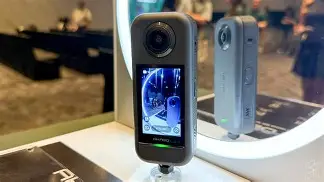
How to avoid it: Verify mount compatibility, availability of housings, and whether adapters are needed. Plan for a small tripod, extension pole, or special 360 monopod—those significantly affect result stability and composition.
Mistake 4: Overlooking battery and storage requirements
Why it happens: Packaging often lists short run times in small print, and buyers forget to budg…How to avoid it: Purchase one or two spare batteries and at least one high‑speed memory card specified for continuous video. For long sessions, bring a USB power bank and learn how heat affects continuous recording.
Mistake 5: Expecting perfect in‑camera stabilization
Why it happens: Stabilization claims can be misleading if the buyer assumes it meets professional action camera standards.
How to avoid it: Evaluate stabilization in real scenarios—walking, bicycling, or vehicle mounting—and plan to use post‑processing stabilization when necessary. If the use case is high‑impact action sports, consider a different camera category or supplemental mount dampening.
Mistake 6: Not testing app connectivity and firmware
Why it happens: Buyers assume mobile apps are stable and firmware is current out of the box.
How to avoid it: Check the app experience before an important shoot: pairing, live preview, and file transfer speed. Update firmware as part of initial setup and confirm release notes to ensure crucial fixes are installed.
Pros & Cons
- Pros
- Affordable entry into immersive 360 capture for casual creators
- Compact and portable—convenient for travel and spontaneous shooting
- User‑friendly controls and mobile apps for quick sharing to social platforms
- Typically compatible with common action camera mounts and selfie poles
- Cons
- Limited low‑light performance compared with larger‑sensor models
- Stitching artifacts can appear near close subjects or complex geometry
- Battery life and heat management limit long continuous recording sessions
- Audio capture usually requires external recording for professional results
Quick comparison: Akaso 360 vs. other 360 camera tiers
| Category | Typical Price Range | Expected Use Case | Strengths | Limitations |
|---|---|---|---|---|
| Entry‑level (Akaso 360) | Budget | Social clips, travel, casual VR experimentation | Cost, portability, easy sharing | Noise in low light, basic stitching, shorter battery life |
| Mid‑range | Moderate | Enthusiast travel vlogging, better stabilization needs | Improved sensors, better software, longer battery life | Higher cost, heavier, learning curve for advanced features |
| Professional | Premium | Commercial VR, professional live events, film production | Superior dynamic range, pro stitching, interchangeable lenses | Very expensive, complex workflows, larger rigs |
Buying guide: what to prioritize for real‑world use
To choose an Akaso 360 or another 360 camera wisely, prioritize features according to how the camera will be used. The following checklist helps match priorities to intended use cases.
Shop the latest Cameras & Photography picks on Amazon.
See Deals →1. Define the primary use case
Is the goal short social media clips, immersive travel diaries, casual virtual tours, or professional VR? For casual social content, entry‑level 360 cameras balance convenience and cost. For production work, the buyer should consider mid‑range or pro solutions that handle low light and heavy post‑processing.
2. Evaluate sample footage and real tests
Always watch representative video, not just marketing stills. Look for stitched footage, low‑light clips, and stabilization samples filmed under the conditions where the camera will be used. If possible, test the camera in person or rely on in‑depth third‑party reviews showing unedited clips.
3. Consider battery and storage logistics
Plan for spare batteries and fast microSD cards suited for sustained video. For day trips, a single extra battery and a high‑capacity card will prevent interruptions. If the user needs multi‑hour recording, factor in portable power or lower capture settings.
4. Check mount compatibility and accessory ecosystem
Confirm whether the camera fits existing mounts, whether a waterproof housing is available, and whether a compatible selfie stick or tripod is sold separately. Small accessories like quick‑release plates, protective cases, and lens caps matter for longevity and flexibility.
5. Test workflow and editing options
Evaluate the mobile app for live preview and quick sharing. For more advanced edits, confirm compatibility with desktop stitching and editing software. Ensure a computer or cloud service meets the hardware requirements for stitching high‑resolution 360 clips.
6. Think about audio strategy
If narration or interviews are central to the project, budget for an external audio recorder or a microphone solution that can be synced in post. For ambient sound, consider a wind muff or positioning the camera to minimize direct wind exposure.
7. Firmware and community support
Look for an active user community and regular firmware updates. Established communities provide tips, workarounds, and third‑party tools that improve results beyond what the camera offers out of the box.
Real‑world scenarios and recommended configurations
Below are three representative use cases and suggested configurations that align expectations with performance.
Travel vlogger (daylight cityscapes and landscapes)
- Settings: highest practical resolution for landscape detail; short clip durations to avoid huge files
- Accessories: small tripod or extension pole, spare battery, 128GB or larger high‑speed card
- Workflow tip: shoot multiple short clips rather than fewer long ones to simplify stitching and editing
Family events and gatherings (indoor lighting)
- Settings: prioritize frame rate and noise‑reduction settings; avoid pushing ISO too high
- Accessories: external audio recorder for speeches, position guests a few meters from the camera to reduce stitching artifacts
- Workflow tip: favor well‑lit rooms or supplemental lighting where possible
Casual action (biking, skating)
- Settings: lower resolution with higher frame rate if available; enable any motion stabilization
- Accessories: solid mount, vibration dampener or cushioned mount plate
- Workflow tip: use slower, smoother camera movements and avoid rapidly changing scenes to reduce stitching errors
Practical pre‑purchase checklist
- Watch unedited sample footage in scenarios similar to planned use
- Confirm mount and housing compatibility for intended activities
- Plan for at least one spare battery and a high‑capacity, high‑speed memory card
- Test the mobile app and check desktop software options for stitching and editing
- Review warranty, return policy, and community support resources
- Make a small test shoot immediately after purchase to identify any shortcomings before important events
Conclusion
The Akaso 360 is a compelling option for buyers seeking an affordable entry into spherical imaging. The most common regrets stem from mismatched expectations, insufficient accessory planning, and underestimating the post‑capture workflow that 360 content requires. By focusing on real‑world use cases—daylight travel, indoor events, or casual action—and by testing sample footage and software ahead of time, buyers can avoid the typical pitfalls. Practical steps like budgeting for extra batteries, choosing the right mounts, and planning an audio strategy go a long way toward producing satisfying panoramic results. With the right expectations and preparation, an Akaso 360 will deliver memorable immersive moments without unnecessary frustration.